 By Vivek Chaurasia
Have you ever felt like your day gets eaten up by repetitive tasks? Do you often think, “There has to be a faster way to do this”? Or maybe you’ve imagined how smooth your business would run if some tasks just happened automatically?
If yes, you’re not alone — and this is exactly where workflow automation steps in.
Let’s break it down in the simplest possible way so you can understand what it is, how it works, and how it can transform your business.
What Is Workflow Automation?
Simple definition
As the word is simplifying the term I it. Workflow automation is made of two words — workflow and automation. So we need to understand what is it In simple terms
Workflow: A workflow is the repeatable series of steps you follow to complete a task or process in your business. Think of it as the “how things move from start to finish.”
For example, when you need to bill a client, your workflow may look like this:
- Create the invoice in your billing software
- Email it to the client
- Wait for approval or signature
- Send a payment link
- Confirm payment and update your records
This set of steps — no matter which tools you use — is your workflow.
In simple words:
A workflow is how you complete something using a sequence of steps.
Automation: Automation simply means setting something up to run on its own.
At its core, every automation follows one simple command:
WHEN this happens → DO that.
For example:
- When a new lead emails you → Do send an alert to your sales team.
- When an invoice gets paid → Do update your CRM automatically.
- When a visitor submits a form → Do send a WhatsApp reply instantly.
Even complex automations are just many “when → do” steps connected together.
In simple words:
Automation is letting software perform actions automatically so you don’t have to.
Putting it all together
Workflow automation means connecting your steps (workflow) with automatic actions (automation) so the entire process runs smoothly without manual work.
It’s like giving your business a digital assistant that works 24/7, never forgets anything, and follows every step perfectly.
How workflow automation works
Workflow automation follows a very simple logic:
A task starts → the system does something → conditions decide the next steps → final result happens.
Imagine a customer submits a form on your website.
With automation:
- They instantly get a WhatsApp message
- Their details go into CRM
- Your team gets notified
- A follow-up reminder is created
- If they don’t respond, the system sends another message
All within seconds. No manual copy, no forgetting, no delays.
Examples of everyday manual workflows
You already follow dozens of workflows daily, even if you don’t call them “workflows.”
- Saving new inquiries from WhatsApp, Facebook into Google Sheets
- Sending the same reply to every customer
- Updating the status of leads
- Sending invoice reminders
- Assigning tasks to staff
- Sharing onboarding steps with new employees
- Sending delivery or booking confirmations
- Collecting customer reviews
- Adding Appointment manually.
These tasks look small individually, but together they consume hours every week.
Automation removes this repetitive load so you and your team can work smarter.
Why Is Workflow Automation Important for Small & Medium Businesses?
Saves time & reduces human error
Manual tasks are slow and prone to mistakes — wrong numbers, missed follow-ups, lost data. Automation performs every step correctly, every time, without depending on human memory or mood. Even if you or your staff are busy or at off, workflows still run automatically.
Improves team productivity
Your team spends less time on copy-paste and reminder work and more time on meaningful tasks like sales calls, service, or strategy.
Automation removes “busy work” and frees your team to focus on high-value tasks that grow the business.
Reduces operational cost
Hiring more people just to handle repetitive admin tasks becomes unnecessary. A single automation can replace hours of manual effort. This directly cuts operational costs and helps small businesses scale without increasing staff.
Helps deliver faster customer service
In today’s world, customers expect immediate responses.
If they message you on WhatsApp, email, or website, delayed replies cost you business.
Automation ensures instant acknowledgment, faster updates, and consistent communication — even outside working hours.
Gives business owners more clarity & control
Automation keeps all your data and you updated in real time. You always know:
- Which leads came in
- Who followed up
- Which payments are pending
- What tasks are due
- New Appointment Scheduling
- How customers are moving through your process
This gives you crystal-clear visibility without running behind your team.
Who can benefit from workflow automation?
If your business uses apps, tools, or any kind of software — workflow automation can help you.
Whether you run a small business or large business automation saves time, removes manual work, and makes your operations more consistent.
You can benefit from workflow automation no matter which industry you work in.
If your day involves repeated communication or data entry, automation (and a bit of AI) can make your life much easier.
Here’s how different types of businesses can use workflow automation and AI-powered automation together:
Agencies (digital, marketing, web development)
Agencies have multiple clients, projects, and deadlines — automation helps you stay organized.
Examples:
1. AI summarizes client briefs so your team instantly knows the requirements.
2. Auto-create tasks in ClickUp/Asana when a new project starts.
3. Auto-send onboarding emails and timelines to new clients.
Freelancers
Freelancers manage sales, delivery, and admin alone — automation reduces workload.
Examples:
1. AI drafts proposal outlines based on a client’s message.
2. Auto-generate invoices and send reminders for overdue payments.
3. Automatically back up project files to Google Drive.
E-commerce stores
E-commerce workflows run on speed — automation ensures nothing is delayed.
Examples:
1. Auto-send order confirmations, shipping updates, and delivery alerts.
2. AI suggests similar products to customers based on browsing patterns.
3. Automatically create support tickets when a customer reports an issue.
Service businesses (repair centers, consultants, tutors)
Service businesses need timely communication and clear scheduling.
Examples:
1. Auto-confirm appointments and send reminders.
2. AI categorizes customer messages (e.g., booking, complaint, pricing).
3. Auto-assign tickets or service calls to available staff.
4: Automatically sends service reminders before its due day to the customer.
Manufacturers & distributors
Automation helps manage stock, orders, and communication.
Examples:
1. Auto-notify suppliers when inventory drops below a threshold.
2. AI reads invoices or challans and updates records automatically.
3. Auto-alert the dispatch team when an order is approved.
Real estate brokers
Real estate involves lots of inquiries and follow-ups — ideal for automation.
Examples:
1. Auto-send property brochures when a lead comes in.
2. AI qualifies leads based on budget, location, and requirements.
3. Auto-remind buyers about site visits or documentation deadlines.
4. Showing multiple property options directly on whatsapp.
Coaches, trainers, therapists
They deal with scheduling, content, and ongoing client engagement.
Examples:
1. Auto-send reminders and session links before scheduled meetings.
2. AI generates session summaries or practice exercises.
3. Auto-deliver course modules on a fixed schedule.
Local businesses (clinics, shops, studios)
Even small businesses benefit from simple automation workflows.
Examples:
1. Auto-send booking confirmations and follow-up reminders.
2. Auto-generate daily sales or attendance reports.
3. AI answers common customer questions via chat or WhatsApp.
How Different Teams and Job Roles Benefit from Workflow Automation?
Most people think workflow automation is only for technical teams, but that’s not true.
Almost every department in a small or medium business deals with repeatable work — things like moving leads through a pipeline, checking data in different systems, updating customer records, preparing reports, assigning tasks, or routing incoming requests to the right person. These tasks may look small individually, but together they take a lot of time and easily slow teams down.
That’s where automation makes a big difference. It handles multi-step tasks across tools, keeps information organized, and ensures the right actions happen at the right time — without anyone manually pushing things forward. From marketing optimizing lead quality, to finance automating invoices, to customer support routing tickets, to HR managing onboarding — every role can work faster and more efficiently with workflow automation.
Sales Operations
Sales process in every business involves juggling leads, follow-ups, quotes, and constant customer communication, you already know how easy it is for opportunities to slip through. A missed follow-up, a delayed response, or an outdated pipeline can directly cost you revenue — not because your team isn’t working hard, but because too much is handled manually.
Workflow automation brings structure and consistency to sales operations. It makes sure every lead is seen, every follow-up happens on time, and sales reps always know what to do next — without relying on memory or manual updates.
How sales teams can benifit from workflow automation:
- New leads picked up instantly, not hours later:
When a lead comes in from the website, ads, or WhatsApp, automation assigns it to the right sales rep immediately and notifies them. There’s no confusion about ownership, and response time stays fast — even during busy hours. - Pipeline stays updated without extra effort:
Instead of reps manually updating CRM stages, automation moves deals forward based on real actions — like a quote being sent, a call completed, or a meeting booked. This keeps your pipeline accurate and trustworthy. - Follow-ups that never get forgotten:
If a prospect goes quiet after a call or proposal, automation sends a reminder message or creates a follow-up task automatically. If there’s still no response, it can escalate or reassign the lead — so deals don’t silently die. - Proposals created faster and more consistently:
Automation can generate proposals using approved templates and customer details, reducing errors and saving time. Sales reps focus on selling, not formatting documents or copying old files.
Customer Support & Service
Support teams handle inquiries across multiple channels — email, chat, WhatsApp, calls. Keeping everything organized manually is tough.
Automation routes tickets, sends updates instantly, and ensures customers get timely responses without waiting for a human.
How customer support might use workflow automation:
- Automatic ticket routing to the right support team:
Incoming customer queries are automatically categorized (billing, technical issue, order status, general support) and routed to the correct agent or department. This reduces response time and avoids internal confusion. - Instant customer acknowledgment and auto-replies:
As soon as a customer reaches out, automation sends an immediate confirmation message like “We’ve received your request.” This reassures customers and improves the overall support experience while your team prepares a detailed response. - SLA-based escalation for unresolved support tickets:
If a support ticket isn’t resolved within a defined time, automation escalates it to a senior agent or manager. This ensures critical issues don’t get stuck and service-level agreements are met consistently. - Automated customer feedback and satisfaction tracking:
Once a ticket is closed, automation sends a feedback request and stores the response automatically. Over time, this helps you track support quality, customer satisfaction, and recurring issues. - Post-support engagement via WhatsApp or email:
After resolving an issue, automation can invite customers to subscribe to your WhatsApp updates or email newsletter. This turns a support interaction into an opportunity for long-term engagement without being intrusive.
Accounting & Finance
If you’ve ever had to chase payments, recheck invoices, or fix mismatched numbers at month-end, you know how time-consuming finance work can be. Billing, expense tracking, and reporting often depend on manual entries, and even small mistakes can cause delays or confusion.
Workflow automation removes this friction. It automatically sends invoices and reminders, updates records when payments are received, and keeps everything in sync across systems. This means fewer errors, less follow-up stress, and a finance process that runs smoothly without constant manual effort.
Workflow automations for finance teams:
- Invoicing:
Invoicing is one of those tasks that never really stops. New clients, repeat customers, partial payments — it’s a constant cycle. Workflow automation helps by generating invoices at the right time, sending them automatically, and tracking their status so nothing gets missed or delayed.
- Client onboarding after payment:
The moment a payment is received, things often get messy — details are scattered, teams aren’t informed, and onboarding gets delayed. Automation captures all required client information, notifies the right team, and starts the onboarding process immediately, without manual coordination.
- Expense tracking and reporting:
Chasing receipts, checking formats, and entering data manually is frustrating and error-prone. Automation can collect expense details, validate them, and push them into your accounting system, reducing back-and-forth and saving hours of manual work.
- Keeping payment status updated everywhere:
Finance teams usually have to update the same payment information in multiple places — accounting software, CRM, internal sheets. Automation keeps everything in sync automatically, so everyone sees the same, up-to-date numbers.
- Signature collection and approvals:
Getting documents signed on time can slow everything down. Workflow automation sends documents for signature, follows up automatically, and updates records once the signing is complete — without anyone chasing emails..
Operations & Administration
If your business runs on daily tasks, approvals, inventory updates, and constant coordination with vendors, then operations is the backbone keeping everything together. But when these things are managed manually, delays, missed steps, and confusion become very common — especially as the business grows.
Workflow automation helps you bring order to this chaos. It removes unnecessary back-and-forth, keeps processes moving without manual follow-ups, and ensures every step happens the same way every time.
How operations teams might use workflow automation:
- Automatic task routing:
Instead of manually deciding who should do what, automation assigns tasks based on the type of work, urgency, or availability. The right person gets notified instantly, so work starts without delays or confusion.
- Inventory alerts before things break:
Running out of stock at the wrong time can slow everything down. Automation keeps an eye on inventory levels and alerts the team the moment stock goes below a set limit, giving you time to act before it becomes a problem.
- Supplier communication without constant follow-ups:
Purchase orders and restock requests don’t need to be written and sent manually every time. Automation sends them automatically to suppliers with the right details, reducing back-and-forth and keeping vendors aligned.
- Daily operational reports, automatically:
Instead of pulling numbers from different places, automation generates and sends daily reports to management. Everyone starts the day with clarity, without someone spending hours preparing updates.
Marketing operations
Marketing operations teams handle everything that happens behind the scenes of a marketing campaign. From managing leads and tracking performance to maintaining clean data across tools, they make sure marketing efforts actually work as planned. With so many moving parts involved, it’s natural for marketing teams to rely heavily on automation to stay organized.
Workflow automation helps marketing operations teams stay ahead of problems instead of reacting to them later. It catches data issues early, keeps systems in sync, and removes repetitive manual work. This allows the team to spend less time fixing mistakes and more time focusing on strategy, optimization, and solving real marketing challenges.
How marketing teams use workflow automation in real life:
- Lead Management:
Leads come in from many places — ads, forms, WhatsApp, landing pages — and keeping them organized is one of the most important parts of marketing operations. Workflow automation collects these leads automatically, checks and organizes the data, and sends each lead to the right system or team. This keeps lead information clean and reliable, so campaigns run smoothly and follow-ups happen without confusion
- Camapign Follow-ups without manual efforts:
Automation triggers emails or WhatsApp messages based on user actions — like downloading a brochure or visiting a pricing page. This ensures every lead gets timely follow-ups, even when the team is busy.
- Subscriber segmentation:
Not every lead or subscriber should receive the same message. Workflow automation automatically groups subscribers as they enter your system based on their interests, behaviour, or source. This helps you send more relevant messages to the right people, improving engagement without manually sorting contacts.
- Clean marketing data without constant fixing:
Duplicate entries, missing fields, and formatting issues can ruin campaigns. Automation catches these issues early and fixes them automatically, so your marketing data stays reliable.
- Clear reporting without manual spreadsheets:
Automation pulls campaign data from ads, email tools, and CRMs into simple dashboards. This helps marketing teams see what’s working and what’s not without spending hours preparing reports.
Social Media Managers
Managing social media is more than just posting content. Messages, comments, leads, approvals, and reporting all need attention — often across multiple platforms at once. When handled manually, it’s easy to miss messages or delay responses.
Workflow automation helps social media managers stay consistent and responsive. It keeps content flowing, messages organized, and engagement tracked — without being glued to every app all day.
How workflow automation can help social media managers in their work
- Content publishing without last-minute rush:
Automation pulls campaign data from ads, email tools, and CRMs into simple dashboards. This helps marketing teams see what’s working and what’s not without spending hours preparing reports.
- DMs and comments handled faster:
When someone sends a message or comment, automation can tag it, send an instant reply, or route it to the right team — sales, support, or marketing — so nothing gets missed.
- Tracking brand mentions and conversations:
Social media moves fast, and it’s impossible to manually watch every comment, tag, or mention across platforms. Workflow automation monitors these conversations for you and brings important mentions into one place, helping you respond on time and stay aware of what people are saying about your brand.
- Collecting and organizing content ideas for posts:
Great content ideas often come from blogs, videos, comments, or team suggestions — but they usually get scattered. Automation gathers content ideas, inspirations, and assets into one organized place, making it easier to plan posts and repurpose content quickly.
- Post performance tracking without messy spreadsheets:
Social media managers are often asked to prove what’s working. Automation pulls post performance data automatically and organizes it into reports. This means less time updating spreadsheets and more time understanding which content connects best with your audience.
E-commerce Management
In e-commerce, speed and accuracy matter every day. Orders, shipping updates, customer questions, and returns can quickly become unmanageable if handled manually.
Workflow automation takes care of these moving parts in the background. Customers get timely updates, your team stays organized, and your store can scale smoothly without extra manual effort.
How e-commerce teams might use workflow automation:
- Smooth order processing from checkout to dispatch:
Once an order is placed, a lot has to go right — correct items, correct address, correct courier details. Automation connects your store with shipping and logistics tools so order data flows automatically. Labels, shipment details, and order status are generated without manual re-entry, reducing mistakes and speeding things up.
- Sales data that actually gets used:
Orders shouldn’t just sit inside your e-commerce dashboard. Automation pushes sales data into your CRM, accounting tools, and marketing systems so you can understand buying patterns, repeat customers, and product performance. This helps you make better decisions, not just close the books
- Keeping customers engaged after the purchase:
Many stores stop communication once the order is delivered. Automation makes sure customers are added to the right communication flows — order tips, usage guides, restock reminders, or future offers — without manually managing lists or segments.
- Catching payment and order issues early:
Failed payments, canceled orders, or checkout errors often go unnoticed until revenue is lost. Automation watches for these events and immediately alerts your team or triggers a recovery message, giving you a chance to fix issues before customers disappear.
- Building trust through timely review requests:
Instead of randomly asking for reviews, automation sends review requests at the right time — after delivery or successful use. Feedback is collected, tracked, and stored automatically, helping you build social proof steadily without manual follow-ups.
IT & Technical Teams
IT and technical teams are responsible for keeping systems reliable and secure — ensuring applications stay online, integrations work as expected, and access is managed correctly across the organization. Many of these responsibilities involve repetitive but critical tasks, where even a small oversight can lead to downtime or security risks.
Workflow automation helps IT teams stay proactive rather than reactive.
How IT teams might use workflow automation:
- User access handled without manual follow-ups:
When someone joins or leaves the company, automation creates or removes access across all required tools automatically. This improves security and avoids situations where access is forgotten or delayed.
- System issues detected before users complain:
Automation continuously monitors servers, APIs, and integrations. If something slows down or fails, alerts are triggered instantly so issues can be fixed before they impact customers or internal teams.
- Backups that run reliably, without reminders:
Instead of depending on someone to remember backups, automation runs them on a fixed schedule. This ensures critical data is always protected and ready when needed.
- Errors organized for faster troubleshooting:
Automation collects error logs from different systems and brings them into one place. This makes it easier for technical teams to spot patterns, diagnose issues, and resolve problems quickly.
Common Workflows That SMBs Can Automate Today
Small and medium businesses often think automation is something complex or “for later.” In reality, many everyday tasks you already do can be automated today using simple tools. These workflows don’t replace people — they remove repetitive work so your team can focus on what actually matters.
1. Lead capture & follow-ups
Leads can come from many places — website forms, ads, WhatsApp, social media, or referrals. The biggest problem isn’t getting leads; it’s responding late or forgetting to follow up.
Workflow automation ensures every lead is captured instantly, stored in the right place, and followed up on time. As soon as a lead comes in, the system can send an acknowledgment message, notify the sales team, and create a follow-up task automatically. This reduces response time and increases the chances of converting leads into customers.
From an SEO and business perspective, this is one of the most commonly automated workflows for SMBs, because faster follow-ups directly impact sales results.
2. Customer support workflows (WhatsApp, email, calls)
Customer queries often arrive across multiple channels — WhatsApp, email, website chat, or phone calls. Managing all of this manually can lead to missed messages and slow responses.
With workflow automation, customer messages are automatically captured, categorized, and routed to the right team or person. Customers receive instant confirmation that their request has been received, while internal teams get clear visibility into open issues. Automation can also track response times and escalate unresolved tickets automatically.
This helps SMBs deliver faster, more consistent support without hiring additional staff.
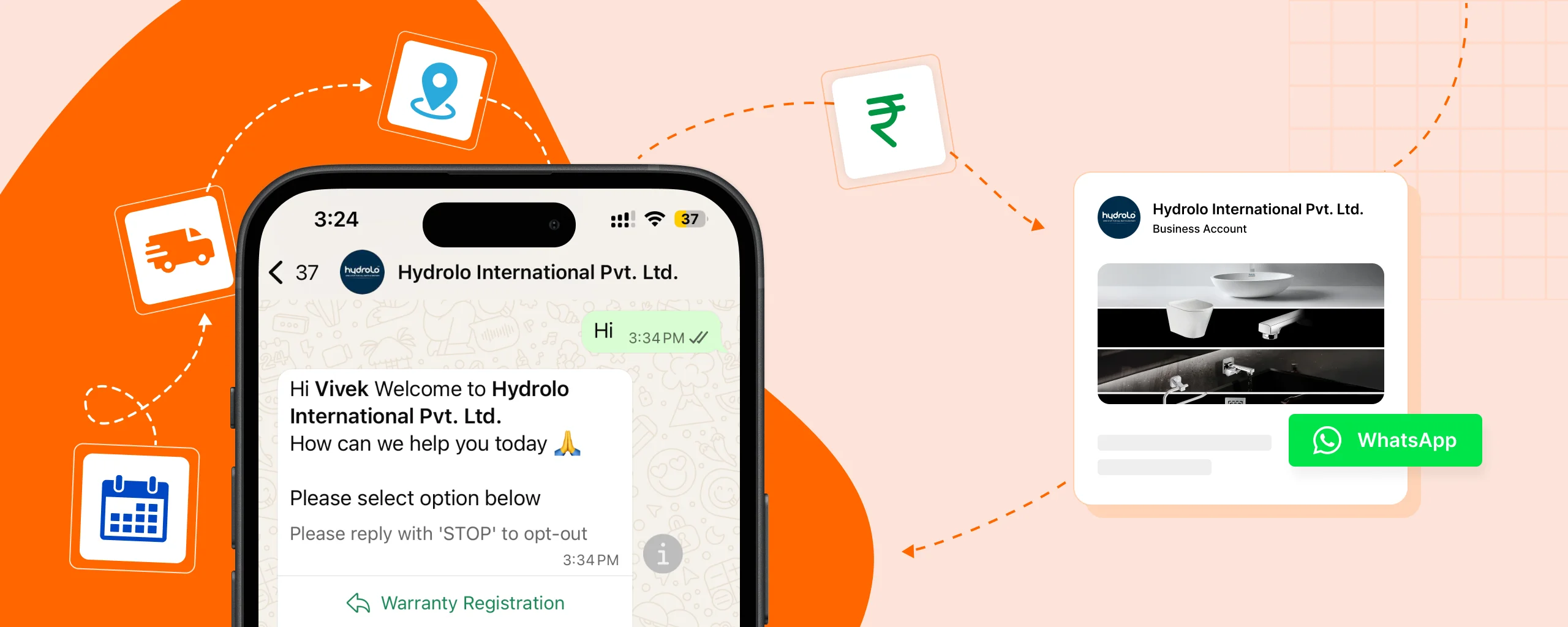
See how we created Customer registration and Complaint registration system over whatsapp for Hydrolo
3. Sales pipeline workflows
Sales teams usually rely on follow-ups, reminders, and pipeline updates — and when these are handled manually, deals often slip through the cracks.
Workflow automation keeps the sales pipeline moving automatically. When a quote is sent, a meeting is booked, or a payment is received, the deal stage updates automatically. Follow-up reminders are triggered if a lead goes quiet, and sales reps are notified at the right time.
This creates a more reliable sales process where no opportunity is forgotten, and managers always have a clear view of the pipeline.
4. Invoice & payment reminders
Invoicing and payment follow-ups are repetitive but critical tasks. Many SMBs lose cash flow simply because invoices aren’t sent on time or payment reminders are forgotten.
Automation helps by generating invoices automatically, sending them to customers, and scheduling payment reminders at regular intervals. When a payment is received, records are updated automatically across accounting tools and CRMs.
This reduces manual work for finance teams and helps businesses get paid faster — a key benefit for small businesses managing cash flow.
See how we created licence and AMC reminders with follow-ups for Greenshield Enviro.
5. HR tasks (attendance, onboarding, approvals)
HR teams handle processes that repeat for every employee — attendance tracking, onboarding, document collection, and approvals. Doing this manually becomes inefficient as the team grows.
Workflow automation simplifies HR operations by automatically recording attendance, sending onboarding emails, assigning tasks to new hires, and routing approval requests to the right managers. Employees know exactly what to do, and HR teams spend less time chasing people.
These workflows are commonly automated even in small companies because they improve consistency and reduce administrative load.
6. Marketing workflows (email sequences, posting, segmentation)
Marketing involves timing, consistency, and clean data — all areas where manual work often breaks down.
Workflow automation helps marketing teams send email sequences automatically, segment contacts based on behavior or source, and schedule content across platforms. Leads receive the right message at the right time without manual intervention, and marketing data stays organized.
This allows SMBs to run professional-looking marketing campaigns without needing large teams or complex systems.
Popular Workflow Automation Tools for SMBs
Choosing the right automation tool is just as important as deciding what to automate. Different tools solve different problems — some focus on ease of use, others on flexibility or cost. The good news is that small and medium businesses today have multiple solid options, depending on their budget and technical comfort.
Below are the most commonly used workflow automation tools by SMBs and how they are typically used in real businesses.
n8n – best for affordability & flexibility
n8n is a powerful, open-source workflow automation tool that’s especially popular with SMBs and growing businesses. It allows you to build complex workflows while keeping costs under control, since it can be self-hosted on your own server.
Businesses often choose n8n when they want deeper control over their workflows — like WhatsApp automation, CRM sync, internal dashboards, or multi-step approval flows. It’s slightly more technical than beginner tools, but extremely flexible once set up. Businesses that want long-term automation without rising subscription costs, n8n is often the best choice.
Zapier – beginner friendly but expensive
Zapier is usually the first automation tool people hear about — and for good reason. It’s very easy to use and works well for simple automations like connecting forms, emails, CRMs, and spreadsheets.
For small teams just starting with automation, Zapier helps validate ideas quickly. However, as workflows grow more complex or volume increases, costs can rise fast. Many small and medium businesses start with Zapier and later move to more flexible tools once automation becomes a core part of operations.
Make (formally known as Integromat ) – best for visual workflows
Make is known for its visual, drag-and-drop workflow builder, which makes it easy to understand how data flows between apps. It’s especially useful for workflows that involve multiple steps, conditions, and transformations.
businesses often use Make for marketing workflows, CRM sync, reporting, and multi-app integrations. It sits between Zapier and n8n — more powerful than Zapier, but still easier to use than fully custom setups.
Custom automation using APIs & small apps
For some businesses, off-the-shelf tools aren’t enough. When workflows are unique or deeply connected to internal systems, custom automation becomes the best option.
Custom automation uses APIs, small backend services, or lightweight apps to connect systems exactly the way the business needs. This approach offers maximum flexibility and performance, especially for WhatsApp automation, compliance workflows, internal tools, or industry-specific processes. While it requires technical expertise, it often provides the flexibility to create the automation which is actually best fit for that business use case.
Signs Your Business Needs Workflow Automation
Many businesses don’t realize they need automation until things start feeling messy or overwhelming. If you’re not sure whether workflow automation is right for you, these signs usually make it very clear.
You repeat the same tasks daily
If your day involves doing the same things again and again—sending the same messages, updating the same sheets, copying data from one place to another—that’s a strong signal. These tasks don’t require decision-making, yet they consume a lot of time. Workflow automation is designed exactly for this kind of work, where rules stay the same but effort stays high.
You lose leads because of delays
When leads don’t get a quick response, they often move on. If inquiries sit unanswered for hours or follow-ups are forgotten because the team is busy, you’re likely losing business without realizing it. Automation ensures leads are acknowledged instantly and followed up on time, even when your team is occupied or offline.
You depend heavily on manual WhatsApp or emails
WhatsApp and email are powerful tools, but when everything is handled manually, things quickly fall apart. Messages get missed, replies are delayed, and there’s no clear tracking of what’s been handled and what hasn’t. If your operations rely on manually replying, forwarding messages, or searching old chats, automation can bring structure and reliability to your communication.
Data is scattered across apps (Sheets, CRM, WhatsApp, Excel)
When customer data lives in multiple places, it becomes hard to trust any of it. Teams end up asking, “Which is the latest?” or “Where is the correct data?” Workflow automation connects these tools so data stays synced automatically. This reduces confusion, errors, and time wasted reconciling information.
Too much time spent on admin tasks
If you or your team spend more time managing tasks, reminders, updates, and reports than doing actual business work, automation is overdue. Admin work will always exist, but it shouldn’t take over your day. Automation quietly handles these background tasks so your team can focus on sales, service, and growth.
If even two or three of these signs feel familiar, workflow automation isn’t a “nice to have” anymore—it’s a practical next step for running your business more smoothly and efficiently.
Benefits You Can Expect Within 30 Days
Workflow automation doesn’t take months to show value. When applied to the right workflows, most SMBs start seeing clear improvements within the first few weeks. These aren’t abstract benefits — they show up in day-to-day operations very quickly.
More leads closed
One of the fastest wins of automation is better lead handling. Leads are acknowledged instantly, follow-ups happen on time, and nothing depends on memory. Even without changing your sales strategy, faster responses and consistent follow-ups alone often lead to higher conversion rates.
In real terms, this means fewer “missed opportunities” and more deals moving forward simply because the system is doing what humans forget to do.
Faster response time
Automation drastically reduces the gap between a customer reaching out and receiving a response. Whether it’s a lead inquiry, support message, or payment question, customers get immediate acknowledgment and clear next steps.
For SMBs, this alone can be a competitive advantage. Many businesses lose customers not because of price or product — but because they reply too late.
Better customer experience
When communication is timely and consistent, customers feel taken care of. Automated updates, confirmations, reminders, and follow-ups reduce uncertainty and confusion.
Customers don’t need to ask, “Did you receive my message?” or “What’s the status?” because the system keeps them informed automatically. This leads to higher trust and fewer complaints.
Clear visibility into your operations
Within a few weeks, automation gives you better clarity into what’s actually happening in your business. Leads, tasks, payments, and support requests are tracked automatically, making it easier to see bottlenecks or delays.
Instead of guessing or asking for updates, you can rely on real-time data.
Fewer manual errors
Manual work almost always introduces mistakes — wrong data, missed follow-ups, duplicate entries. Automation follows rules consistently and reduces these errors significantly.
This is especially noticeable in areas like invoicing, data entry, reporting, and customer communication.
More free time for high-value work
Perhaps the most noticeable benefit is time. Once repetitive tasks are automated, you and your team spend less time on admin work and more time on activities that actually grow the business — sales conversations, improving services, or planning next steps.
Many business owners describe this as feeling “less busy but more productive” within the first month.
Easier scaling without extra hiring
As workflows run automatically, your business can handle more leads, customers, or requests without immediately adding more staff. Automation absorbs the extra load quietly in the background.
For growing SMBs, this makes scaling more predictable and less stressful.
Stronger team accountability
With tasks, notifications, and updates happening automatically, there’s more clarity on who needs to do what and when. This reduces dependency on reminders and improves overall accountability across teams.
How to Start Workflow Automation in Your Business
Starting with workflow automation doesn’t require a big budget, and a large team, however it does require some technical knowledge . The key is to start small, focus on real problems, and build step by step. Here’s a simple, practical way to get started without overwhelming yourself or your team.
Step 1: Identify repetitive tasks
Begin by looking at what you or your team do repeatedly every day or every week. These are usually tasks that follow the same steps every time and don’t require much decision-making.
For example:
- Sending the same replies to new inquiries
- Manually updating spreadsheets or CRMs
- Following up on payments or leads
- Assigning tasks after a form submission
If a task makes you think, “We do this all the time,” it’s a strong candidate for automation.
Step 2: Map your current workflow
Before automating anything, clearly understand how the task works today. Write down the steps as they currently happen — not how you wish they happened.
For example:
- Lead comes in from the website
- You get notified
- You add the lead to a sheet
- You send a WhatsApp message
- You remind yourself to follow up
This step helps you spot gaps, delays, and unnecessary steps. Automation works best when the underlying process is already clear.
Step 3: Choose an automation tool
Now decide which tool fits your needs and comfort level. You don’t need the “best” tool — you need the right one for your current stage.
- If you want something simple and quick to start, beginner-friendly tools work well.
- If you want more control, flexibility, or WhatsApp-based workflows, more advanced or self-hosted tools are a better fit.
Choose based on:
- Your budget
- Your team’s technical comfort
- The complexity of the workflow you want to automate
Step 4: Build a simple workflow first
Resist the urge to automate everything at once. Start with one small, high-impact workflow.
A good first automation could be:
- New lead → auto reply → notify sales
- Payment due → reminder message
- Form submitted → task created
Keep it simple. The goal is to get a working automation that saves time immediately and builds confidence.
Step 5: Test → Improve → Scale
Once your workflow is live, test it with real data. Watch how it behaves, check for errors, and see how your team interacts with it.
After that:
- Fix small issues
- Improve messaging or timing
- Add conditions or extra steps if needed
Only after one workflow is stable should you move on to automating the next one. Over time, these small improvements add up to a fully automated system that runs large parts of your business smoothly.
A simple mindset to remember
Workflow automation is not a one-time setup — it’s an ongoing improvement process. Start small, learn from real usage, and gradually scale. Businesses that approach automation this way see faster results and fewer frustrations.
Common Mistakes to Avoid
Workflow automation can create huge efficiency gains — but only when it’s done thoughtfully. Many businesses rush into automation, get disappointing results, and assume “automation doesn’t work for us.” In reality, it’s usually a few common mistakes that cause problems, not the idea of automation itself.
Here are the most frequent mistakes SMBs make — and why avoiding them matters.
Automating everything at once
One of the biggest mistakes is trying to automate too much, too quickly. Businesses often attempt to automate sales, support, finance, and marketing all at the same time, without stabilizing even one workflow properly.
This usually leads to confusion, broken automations, and teams losing trust in the system. Automation works best when you start with one or two high-impact workflows, get them running smoothly, and then expand gradually. Trying to automate everything at once almost always creates more chaos instead of reducing it.
Ignoring data structure & naming
Automation depends entirely on data — and messy data breaks workflows silently. Poor field naming, inconsistent formats, duplicate records, or unclear status values create problems that are hard to debug later.
For example, if one system uses “Paid,” another uses “Completed,” and a third uses “Yes,” automation logic starts failing. Clean data structure, consistent naming, and clear rules are not optional — they are the foundation of reliable automation. Skipping this step leads to automations that look fine but behave unpredictably.
Not training the team
Even the best automation will fail if the team doesn’t understand how it works. When teams don’t know what’s automated, what’s manual, or how to handle exceptions, they accidentally break workflows or bypass them completely.
Automation should come with clear instructions:
What happens automatically, what still needs human input, and what to do when something looks wrong. Training doesn’t need to be complex, but it does need to exist. Otherwise, automation becomes something people work around instead of working with.
No monitoring after setup
Automation is not “set it and forget it.”
Workflows can fail due to API changes, expired credentials, data issues, or edge cases that weren’t obvious during setup.
Without monitoring, these failures often go unnoticed — until leads are missed, messages stop sending, or payments aren’t followed up. Proper automation always includes basic monitoring, alerts, and periodic reviews to make sure everything continues to run as expected.